
How to Build a Personal AI Toolbar in Chrome
July 1, 2026
The 7 Best AI Tools for Creative Writing (and the Prompts to Use)
July 2, 2026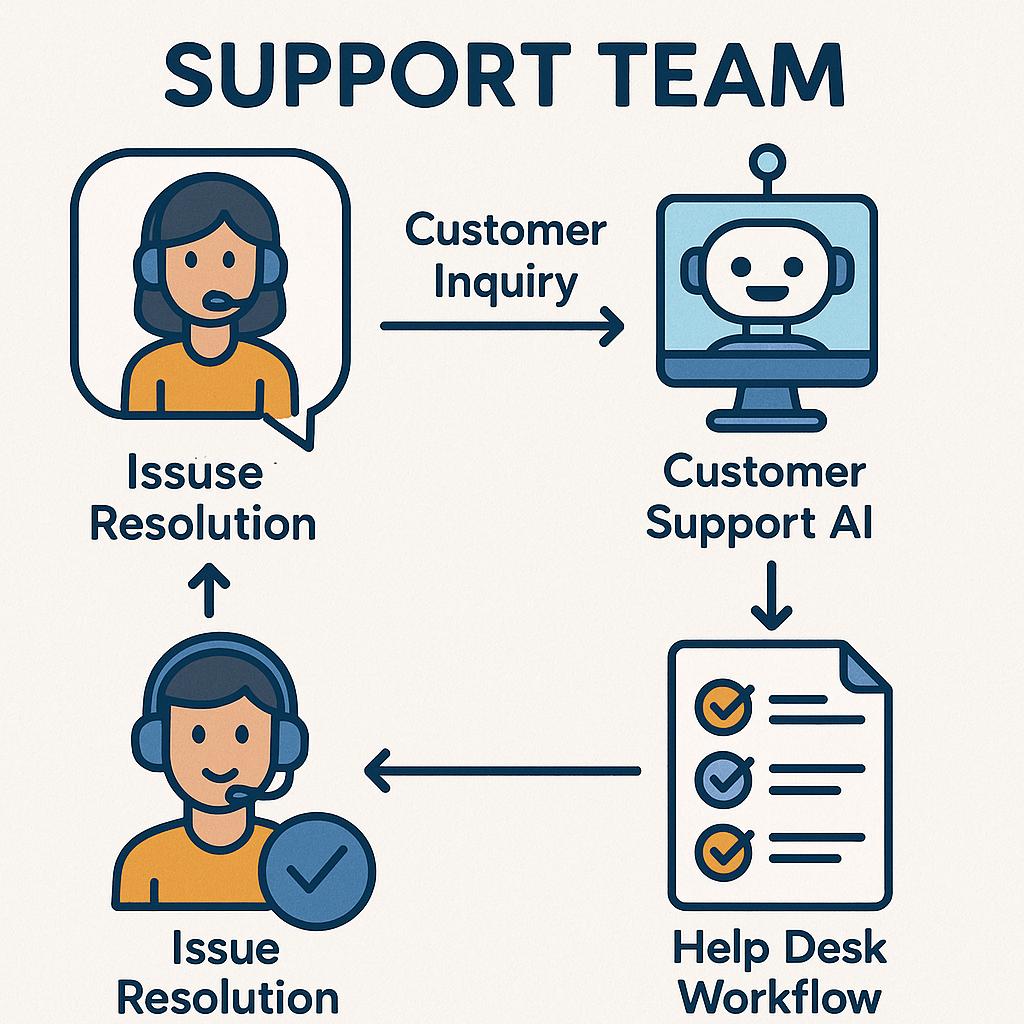
How to Build a Prompt Library Around Your Offers
Support teams can use prompt systems for replies, macros, summaries, escalations, and QA.
Every customer support team faces the same daily challenge: how to respond quickly and consistently, no matter the complexity of the request. With AI now powering help desks and chat support, the secret to unlocking real productivity is less about the tools and more about the prompts you feed them. That’s why building a prompt library tailored to your support workflows isn’t just smart—it’s a game-changer.
Why Support Team Prompts Are Essential
Prompt engineering isn’t just for AI enthusiasts. For support teams, curated support team prompts help you:
- Deliver consistent, high-quality responses
- Speed up ticket resolution with ready-made macros
- Summarize conversations for easy handoffs and escalations
- Automate quality assurance (QA) checks
With the right customer support AI prompts, you’ll empower your team to focus on what matters: helping customers, not wrestling with repetitive tasks.
Framework for Building Your Prompt Library
Ready to get organized? Here’s a simple approach to build a prompt library that aligns with your help desk workflow:
-
Map Your Support Scenarios:
- Triage and ticket categorization
- Reply templates for common questions
- Escalation handoffs
- Summary requests for complex threads
- QA checklists
-
Design Modular Prompts:
- Keep prompts concise and outcome-focused
- Use variables for customer/account details
- Document instructions for context (e.g., “respond empathetically”)
-
Test and Iterate:
- Get team feedback on clarity and usefulness
- Track which prompts save the most time
- Refine based on real conversations and results
Pro tip: Use a tool like My Magic Prompt to rapidly generate, store, and share your best prompts across platforms like ChatGPT, Claude, and Gemini.
Example: Macros for Common Scenarios
| Scenario | Prompt Example |
|---|---|
| Order status inquiry | “Draft a friendly update on order status for customer {{Customer Name}}. Include estimated delivery and contact info for follow-up.” |
| Escalation summary | “Summarize this support conversation for the Tier 2 team. Highlight main issue, steps taken, and next actions.” |
| QA review | “Check this support reply for tone, accuracy, and completeness. Suggest improvements if needed.” |
Best Practices for Managing Your Prompt Library
- Organize prompts by use case (replies, macros, summaries, QA, etc.)
- Document when and how to use each prompt
- Regularly update prompts as products and policies evolve
- Share access with your team for easy collaboration
- Consider browser extensions like MagicPrompt for Chrome to streamline usage
Want more in-depth strategies? Check out this Gartner article on AI in customer service for industry insights.
FAQ: Support Team Prompts & Customer Support AI Prompts
- What are support team prompts?
- Support team prompts are pre-written instructions or questions designed for AI tools to automate replies, summaries, escalations, and QA in customer support workflows.
- How do I create effective customer support AI prompts?
- Start by identifying common use cases, keep instructions clear, use variables for personalization, and iterate based on team feedback and results.
- Can I use prompt libraries across different AI platforms?
- Yes! Tools like My Magic Prompt help you create prompts compatible with ChatGPT, Claude, Gemini, and more so you can streamline support across channels.
- How often should I update my help desk prompt library?
- Regularly review and update prompts as your products, policies, or customer needs change—at least quarterly, or after major updates.
- What’s the best way to organize my prompts?
- Group prompts by workflow (replies, summaries, QA, escalations), document usage, and use collaborative tools for easy access and updates.
Level Up Your Support Workflows
Building a prompt library isn’t just about saving time—it’s about delivering better customer experiences and empowering your team to shine. Ready to see how much further you can go? Explore My Magic Prompt and start building your own prompt library today.