
How to Build AI Prompt Systems for Support Teams
July 7, 2026
What Makes a Prompt “High-Performing”?
July 7, 2026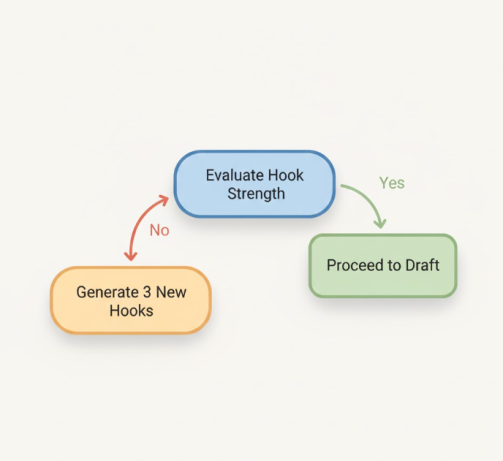
✍️ Introduction: Why One Prompt Is Never Enough
If you’ve ever typed a long prompt into ChatGPT or Claude and thought, “Why didn’t this come out exactly how I imagined?”—you’re not alone.
Most creators try to do too much in a single prompt. What you really need is a multi-step workflow — a repeatable sequence of well-structured, sequential prompts that gets you consistent, high-quality output every time.
The good news? Turning one idea into a multi-step workflow is easier than you think, and once you learn it, your entire AI process becomes faster, clearer, and way more powerful.

📚 What Is a Multi-Step Workflow?
A multi-step workflow is a structured sequence of prompts that break down a task into logical stages. Instead of forcing the AI to handle everything at once, you:
- Clarify inputs
- Generate options
- Evaluate results
- Refine outputs
- Produce the final asset
This approach improves accuracy, reduces rewrites, and gives you more creative control.
🔧 How to Turn One Prompt Into a Full Multi-Step Workflow
Below is a simple, creator-friendly framework you can use for any project.
1. Start With a Single “Master Prompt”
This is your starting idea. Example:
“Write a short-form video script about the benefits of a prompt library.”
Useful, but limited.
2. Break It Into Sequential Prompts
Instead of one long request, try this sequence:
- Research Step: “List the top 7 benefits creators get from using a prompt library.”
- Angle Selection: “Turn those benefits into 3 different creative angles for a short-form script.”
- Script Draft: “Write a 30-second script using Angle #2 in a friendly, high-energy tone.”
- Revision Pass: “Shorten the script to under 120 words while keeping the key message.”
This step-by-step workflow gives you more control and dramatically reduces inaccurate or generic responses.
3. Add Conditional Branches
Sometimes a workflow needs conditional steps, such as:
- “If the tone is too formal, rewrite it more casually.”
- “If the examples feel generic, add industry-specific details.”
- “If the hook isn’t strong, propose 3 new ones.”
4. Turn It Into a Reusable Template
Once the workflow works, save it.
Creators who save workflows build repeatable systems rather than starting from scratch every time.
🛠 How My Magic Prompt Helps You Build Better Workflows
My Magic Prompt makes workflow-building simple:
- The Prompt Builder helps you structure your steps.
- The Template Library gives you ready-made sequential prompts.
- The Chrome Extension lets you run workflows directly inside ChatGPT.
❓ FAQ: Multi-Step Workflow Basics
1. What’s the difference between a prompt and a multi-step workflow?
A prompt is a single instruction. A workflow is a guided sequence of prompts that produces more accurate, consistent outputs.
2. Why do sequential prompts work better?
They reduce cognitive load for the AI, allowing it to focus on one task at a time.
3. How do I organize my prompts?
You can store them in a document, database, or—better yet—a dedicated tool like My Magic Prompt that keeps everything searchable.
4. How do I create conditional steps?
Ask the AI to evaluate its own output, then give instructions for adjustments based on quality, tone, or relevance.
5. Can I reuse multi-step workflows?
Absolutely! That’s why saving them as templates is essential to your long-term productivity.
🤍 Soft CTA
If you want to build smarter, faster, more consistent AI workflows, explore My Magic Prompt for ready-to-use templates, prompts, and toolkit features designed for creators just like you.